
The Customer Price Report lists every customer and property enrolled in the programs you choose, with one row per service and the price that service would be invoiced at. It also shows where each price comes from (an accepted estimate, a price override, or your square-footage pricing) and how it compares with your list price.
It is especially useful before renewals, when you want to review which customers have price overrides and how far those prices are from your standard pricing.
To open it, go to Reports → Customer Price Report.
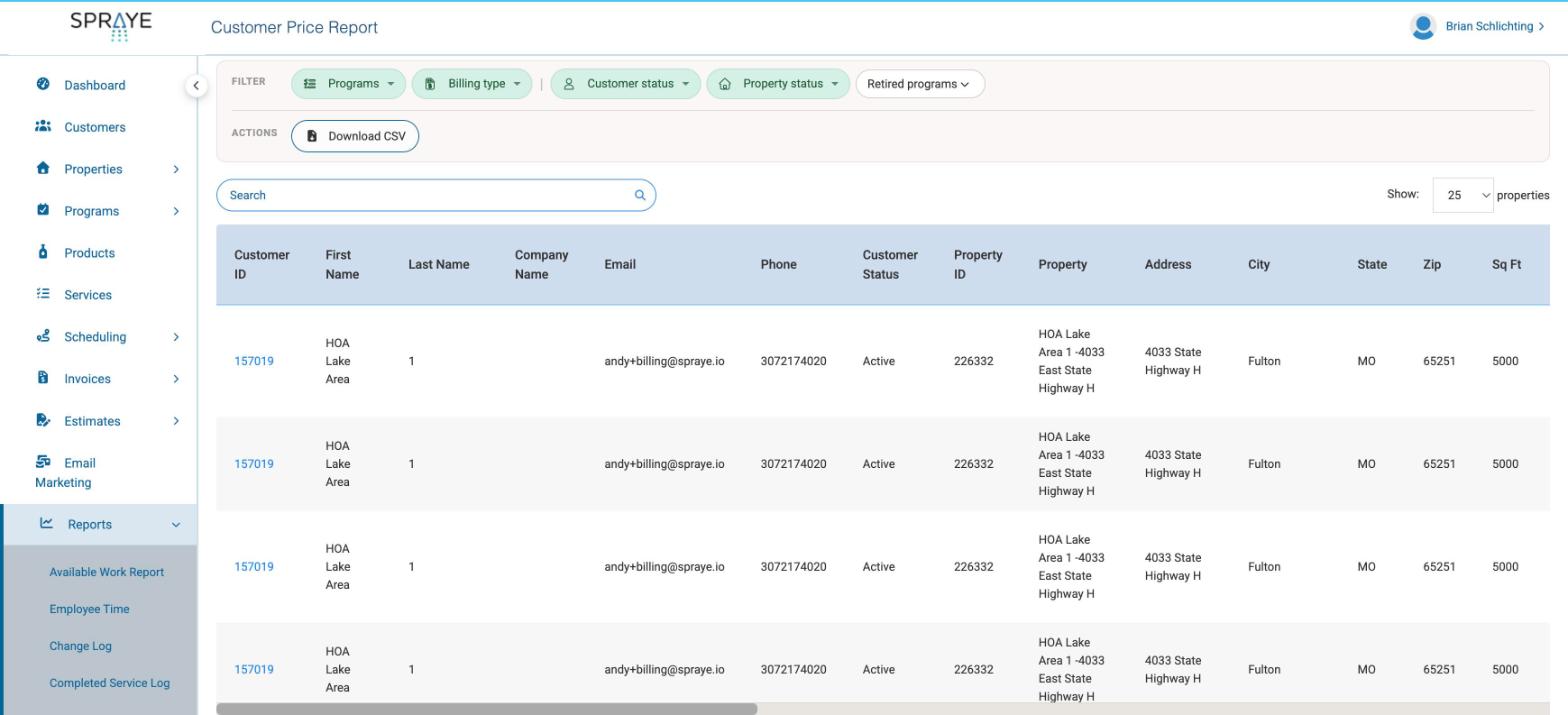
Filters
The filters are at the top of the page. The table updates as soon as you change one.
- Programs – choose one or more programs. Each program shows its billing type in parentheses, so the Prepay and Pay as you go versions of a program can be picked separately. Leave it empty to include every program.
- Billing type – Prepay, Pay as you go or Manual Billing.
- Customer status – set to Active by default.
- Property status – set to Active by default.
- Retired programs – retired programs are hidden unless you pick one in the Programs filter or choose Include retired.
- Search – type part of a customer or property name to narrow the list.
Show sets the number of properties per page, not the number of rows. Every program and service on a property stays together on the same page.
What each row shows
Each row is one service, on one program, at one property. The columns run from left to right in four groups. Scroll the table sideways to see them all.
- Customer – Customer ID (click it to open the customer), First Name, Last Name, Company Name, Email, Phone and Customer Status.
- Property – Property ID, Property, Address, City, State, Zip, Sq Ft, Difficulty and Grass Type.
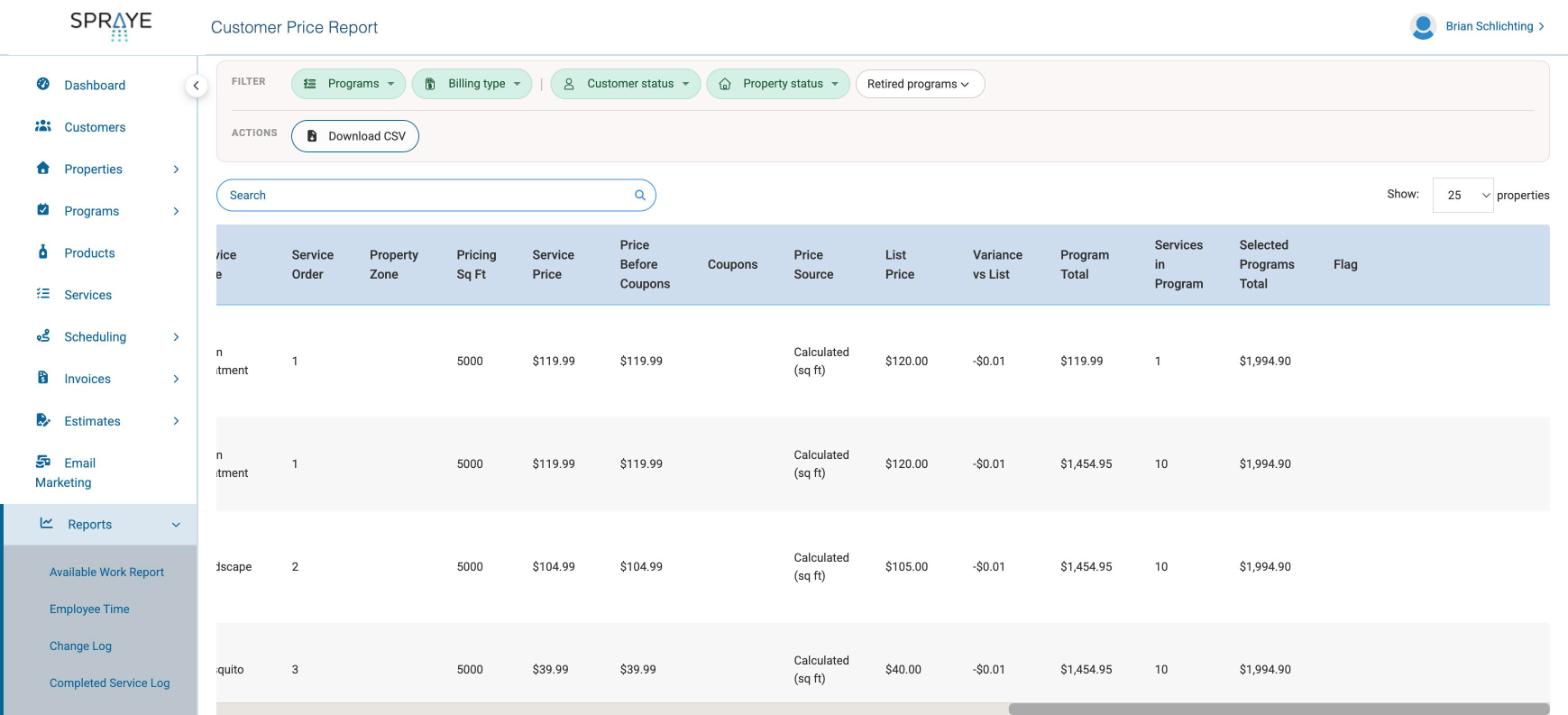
- Program and service – Program ID, Program, Billing Type, Sale Date, Service, Service Type, Service Order, Property Zone and Pricing Sq Ft (the square footage the price was calculated from).
- Pricing – Service Price, Price Before Coupons, Coupons, Price Source, List Price, Variance vs List, Program Total, Services in Program, Selected Programs Total and Flag.
Understanding the prices
- Service Price – what the customer would be invoiced for the service, after service coupons and before invoice-level coupons and sales tax.
- Price Before Coupons and Coupons – the price before service coupons, and how much those coupons took off. A one-time coupon that has already been used on an invoice is not counted.
- Price Source– which rule set the price before coupons. Spraye checks them in this order and uses the first one that applies:
- Accepted estimate – the price on the estimate the customer accepted.
- Program override – a price override set for the whole program on that property.
- Service override – a price override set for that one service on the property.
- Calculated (sq ft) – your standard pricing, worked out from the property's square footage.
- List Price – what your standard square-footage pricing would charge for the service, ignoring any override.
- Variance vs List – the difference between the price before coupons and the List Price. A negative number means the customer is paying less than list.
- Program Total – the total of the Service Prices for that program on that property. Services in Program is how many services that total covers.
- Selected Programs Total – the total for the property across all the programs in your current filters.
Flags
The Flag column points out rows to check before you rely on the price.
- Program-level override applied per service – a program-level override is billed as the price of each service in the program, so the Program Total can be higher than a flat program price.
- Price unavailable – the price could not be worked out because the property, service or company pricing settings are missing. The price is left blank and the row is left out of the totals.
- Enrollment customer differs from property owner – the program is still assigned under a different customer than the property's current owner, for example after the property changed hands. Check the customer before using the price.
- No active services on this program – the program has no remaining services on that property. It is listed once with the service left blank.
Download CSV
Click Download CSV to export everything that matches your current filters and search, not just the page on screen. The file has the same columns as the table.
If you have a large number of customers and the export takes too long, you'll see a message asking you to narrow the filters. Choose one or more programs and download again.
Reviewing overrides before next season
- Select this season's programs in the Programs filter.
- Click Download CSV and open the file in a spreadsheet.
- Filter the Price Source column to Program override, Service override or Accepted estimate to see every customer who isn't on your standard pricing.
- Sort by Variance vs List to find the prices furthest from list.
Things to know
- Invoice-level coupons and sales tax are not included in any price on this report.
- Sales visits and standalone services are not included.
- Canceled and skipped services are left out.
- This report doesn't change any pricing. To change a price, edit the override on the property or update your service pricing.