
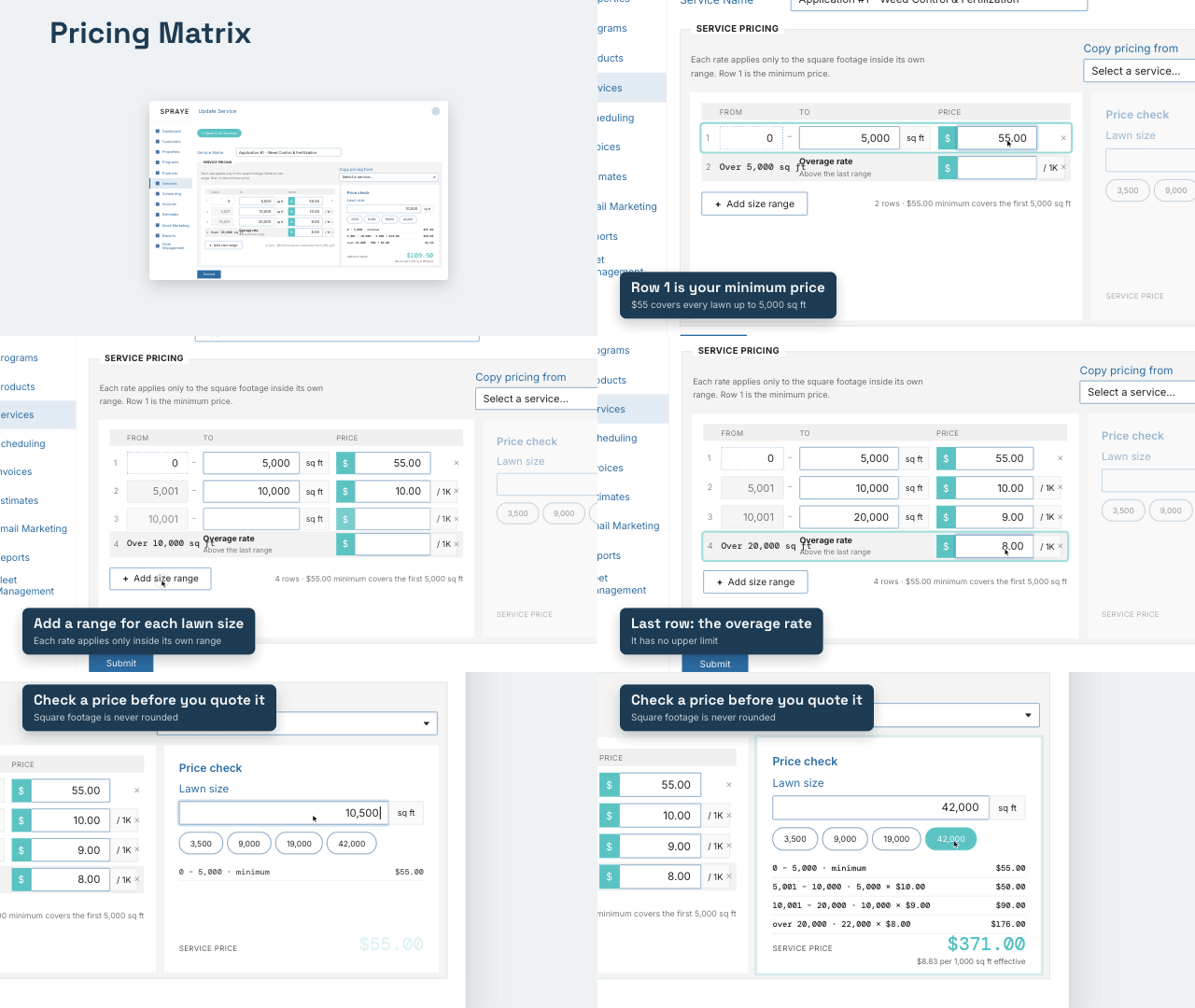
The Pricing Matrix prices each service by lawn size using square-footage ranges. Each range has its own rate, so larger lawns can get a lower rate per 1,000 sq ft. It replaces the older model (base fee + price per 1,000 sq ft + minimum fee), which Spraye now calls legacy pricing.
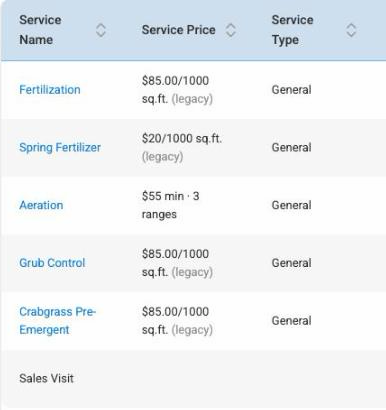
Who has it: the Spraye Support team switches companies over to the Pricing Matrix, one company at a time. If you'd like to move to the Pricing Matrix, open a ticket with Support. Once your company is on it, the Services list shows each service's price as a matrix summary, like $55 min · 3 ranges.
IMPORTANT NOTE: The new Pricing Matrix is NOT compatible with legacy estimates. You must use Interactive Estimates in order to use the new pricing.
How the price is calculated
A matrix is a list of rows:
- Row 1 is the minimum price. It's a flat price that covers every lawn up to the end of row 1 (for example, $55 for 0 to 5,000 sq ft).
- Each later row is a rate per 1,000 sq ft. The rate applies only to the square footage inside that row's range, and is added on top of the minimum.
- The last row is the overage rate. It has no upper limit and covers everything above the last range.
Example matrix: 0–5,000 sq ft = $55 minimum · 5,001–10,000 = $10 per 1,000 · 10,001–20,000 = $9 per 1,000 · over 20,000 = $8 per 1,000.
| Lawn size | Calculation | Price |
|---|---|---|
| 4,000 sq ft | $55 minimum | $55.00 |
| 9,000 sq ft | $55 + (4,000 ÷ 1,000 × $10) | $95.00 |
| 10,500 sq ft | $55 + (5,000 ÷ 1,000 × $10) + (500 ÷ 1,000 × $9) | $109.50 |
| 19,000 sq ft | $55 + (5,000 ÷ 1,000 × $10) + (9,000 ÷ 1,000 × $9) | $186.00 |
| 42,000 sq ft | $55 + (5,000 ÷ 1,000 × $10) + (10,000 ÷ 1,000 × $9) + (22,000 ÷ 1,000 × $8) | $371.00 |
Good to know:
- Square footage is not rounded. Rates are per 1,000 sq ft, but a 10,500 sq ft lawn is priced on exactly 10,500 sq ft.
- Difficulty levels multiply the whole calculated price (minimum included), and the result never goes below the row 1 minimum. The "apply the multiplier to the entire cost" setting doesn't apply to matrix pricing. See Difficulty Level Price Multipliers.
- Property zones: if a service is tied to a property zone, the zone's square footage is used instead of the property's total yard size.
- No square footage on a property means the service is priced at the row 1 minimum.
- Price overrides still win. Estimate, program and Service Pricing tab overrides are used as entered, with no multiplier. See Hierarchy of Price Overrides.
- Existing invoices don't change when you edit a matrix.
Set up a service's Pricing Matrix
- Go to Services and click the service name (or Add Service for a new one).
- In the Service Pricing box, fill in row 1: the square footage it goes To and the minimum price.
- Click Add size range for each additional range, and enter where it ends (To) and its rate per 1,000 sq ft. The From value fills in automatically from the row above.
- Enter the Overage rate in the last row. It applies to everything above your last range.
- Click Submit.
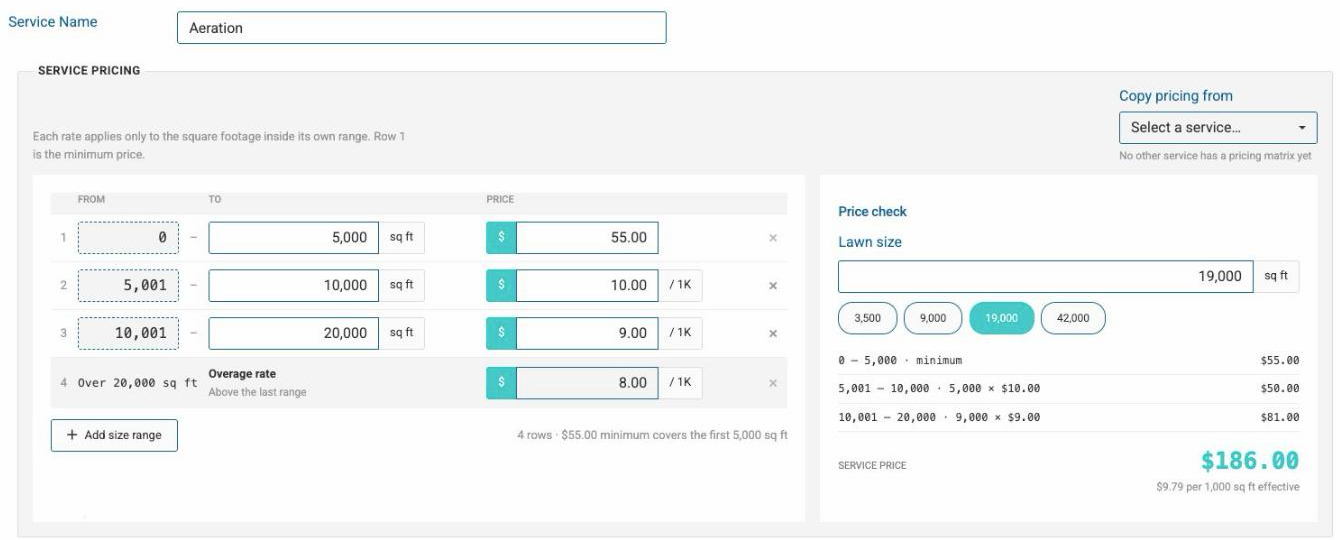
To remove a range, click the × at the end of its row. To start from another service's pricing, choose it under Copy pricing from (only services that already have a matrix are listed). Copying replaces the rows on the screen, so you'll be asked to confirm if you've already typed some.
If the matrix isn't valid, the service isn't saved and you'll see "The pricing matrix was not saved" with the reasons. A valid matrix:
- has at least 2 rows (the minimum and at least one rate),
- starts at 0 sq ft,
- has ranges in order with no gaps or overlaps (each row starts 1 sq ft after the row above ends),
- ends with an open-ended overage row (leave its "To" blank),
- has no negative prices.
Until a service has a matrix, the box shows Legacy pricing on file (its old base fee, minimum fee and price per 1,000 sq ft) for reference.
Check a price before you quote it
When you edit a service that's already saved, the Price check panel shows what the matrix charges for any lawn size. Type a square footage (or click one of the quick sizes) to see the price and how each range adds up.
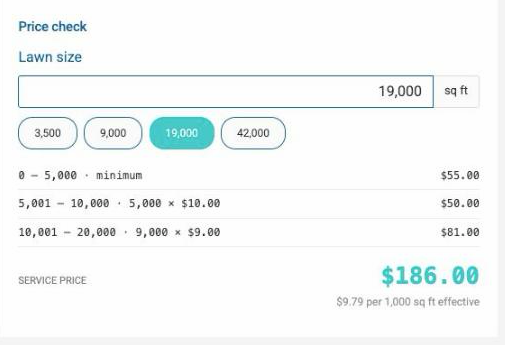
The Price check uses the saved matrix. After changing the rows, click Submit and open the service again before checking a price.
Where you'll see matrix prices
- Services list: each service shows a matrix summary, like $55 min · 3 ranges. A service without a matrix yet shows its old price marked (legacy).
- Property Service Pricing tab, estimates and invoices: prices come from the matrix and the property's square footage. See Property Profile – Service Pricing Tab.
- Settings: the Service Fees section is labelled legacy pricing model. Its base fee and minimum service fee don't apply to services priced by a matrix.
Bulk upload (CSV)
The services CSV upload can't set a pricing matrix. Leave the price and fee columns blank: rows that include a price or service fee are skipped with a warning. Then set each service's matrix on its Edit Service page.