
Spraye utilizes automated statements to help your business manage collections seamlessly, keep customers informed of their balances, and reduce administrative overhead.
1. Automatic Monthly Statements
Spraye features a built-in automated billing cycle to prompt customers to clear outstanding balances.
- Delivery Schedule: The system automatically generates and emails monthly statements on the 1st of every month with last month as the start/end date for the statement.
- Recipient Logic: Statements are only sent to customers who have an active, outstanding balance. Customers with a $0.00 balance will not receive an automated email.
To Enable automatically sending monthly statements:
Step 1: Go to Global Settings page
Hover over your profile image in the top right corner of your screen and select Settings. You can also navigate directly to: https://dashboard.spraye.io/admin/setting
Step 2: Scroll to the Invoices Settings section
On the Settings page, scroll down until you reach the Invoices Settings section.
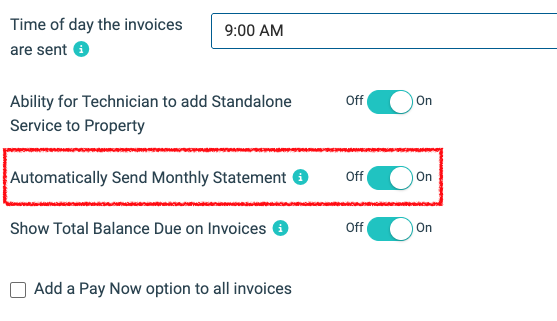
Step 3: Toggle on "Automatically Send Monthly Statement" option
Locate the Automatically Send Monthly Statement switch and toggle it to the ON position.
Step 4: Click Submit
Click the Submit button to save your changes.
2. On-Demand Manual Generation
If a customer requests a statement mid-month, or if you need to review their ledger internally, you can generate a statement at any time.
- Navigate to the Customers tab and open the specific customer record.
- Click the Generate Statement button located at the top of the profile page.
- Enter a specific date range for the statement, or leave the start and end dates blank to run the statement for all time.
- Review, print, or manually email the PDF snapshot of their account ledger.
3. The Customer Portal Experience
Customers have 24/7 access to their financial history. When a customer logs into their Spraye Customer Portal, they can:
- View their complete account statement history.
- Track individual invoices, payments made, and any Available Credit balances.
- Pay off their entire outstanding statement balance directly online.
4. Pro-Tip: Show Total Balance Due on Invoices
You can increase collection rates by displaying a customer's total statement balance on every single invoice they receive.
To enable this feature:
- Go to your Global Invoice Settings.
- Toggle ON the option to "Show Total Balance Due on Invoices".
- Result: When an invoice is sent, it will display the specific cost of that service plus a dynamic line item showing the customer's total outstanding account balance, prompting them to clear the entire statement.
5. Statement Information
Statements show the following information:
- Statement Number
- Customer Id
- Date
- Bill to Address
- Account Summary
- Invoice Date
- Invoices Number
- Description which shows the Property Name and Address
- Charges
- Credits
- Statement Balance
- Account Current Balance Total
Pro Tip: Sending Only Unpaid Invoices
The Statement feature in Spraye is designed to show all account activity within a selected date range, including every paid invoice, payment, and credit, rather than displaying only outstanding balances.
If you want to send a customer a list of only unpaid invoices (rather than a lengthy statement showing full payment history), follow the steps in our How to Combine Multiple Invoices Into One Invoice knowledge base article.
Troubleshooting FAQ
- Where can I see a statement that was already sent out to one of my customers? You can view a customer's statement directly from their profile. Go to the customer profile and click Generate Statement at the top of the screen. Spraye doesn't store a log of previously *sent* statements, but regenerating one with the same date range will give you an identical snapshot.