
This article explains how to utilize the Print Work Orders feature to streamline onsite service documentation, especially for customers receiving multiple services at a single stop.
Overview
For those who pre-print documentation, providing multiple invoices for a single visit can lead to customer confusion regarding total costs and payment. To simplify the onsite experience, you can print Work Orders instead of Invoices.
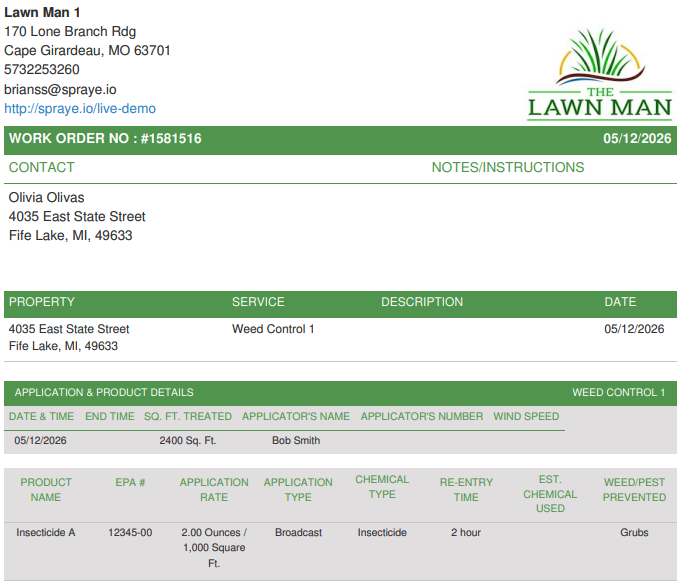
Work Orders provide a professional record of the service performed without displaying dollar amounts. This allows you to hand the customer a summary of work completed while handling the actual billing/invoicing at a later date.
How to Print Work Orders
You can generate Work Orders in bulk directly from your routing screen.
Navigate to the Scheduled Routes screen.
Use the filters or checkboxes to select the jobs you intend to service.
Locate the action button at the top of the table labeled "Print Work Orders."
The system will generate a PDF containing the Work Orders for all selected jobs, using the same clean format currently utilized for Group Billing properties.
Key Features & Benefits
1. No Pricing Displayed
Unlike a standard invoice, the Work Order excludes all pricing, tax, and total balance information. This is ideal for:
Technicians who do not handle collections.
Stops with multiple services where a single consolidated invoice will be sent later.
Privacy-sensitive commercial environments.
2. Consolidated Experience
If a customer has three separate services scheduled for the same visit, printing three Work Orders is significantly less confusing than handing over three separate "bills." This reinforces that the visit is a single service event
Frequently Asked Questions
Q: Will this replace the invoice in the system? A: No. The Work Order is simply a print option for onsite use. The system will still generate the necessary invoices in the background based on your billing settings, which can be sent or viewed in the Customer Portal later.
Q: Can I still print invoices if I prefer? A: Yes. The "Print Invoices" functionality remains unchanged. The "Print Work Orders" button is an additional tool for your workflow.
Q: Can my technicians print these from the field? A: This specific bulk-printing feature is designed for the Scheduled Routes screen (typically used by office staff for pre-printing). However, the same Work Order format is accessible via the mobile side of the platform for individual jobs.