
Right-Side Routing is a specialized routing algorithm designed to order your technician's daily stops so that properties are approached from the right-hand side of the road wherever possible.
By minimizing left turns across oncoming traffic and avoiding U-turns in tight neighborhoods, right-side routing saves fuel, reduces transit time, and enhances driver safety on busy streets.
Key Benefits
- Increased Safety: Reduces risky left turns against oncoming traffic, especially when maneuvering larger service trucks or towing trailers.
- Fuel & Time Efficiency: Keeps vehicles moving smoothly along continuous loops rather than idling at dangerous left-hand turns or intersection traffic lights.
- Easier Curb-Side Parking: Ensures the service vehicle park directly adjacent to the target property curb, allowing safer equipment unloading and lawn access.
How Right-Side Routing Works
When optimizing a route, the system evaluates the directional vector of the vehicle and the side of the street where each property address resides:
- Directional Map Analysis: The routing engine checks the direction of travel along each roadway on the schedule.
- Right-Hand Prioritization: Stops are grouped and sequenced so the vehicle's approach aligns with the right-hand curb of the property address.
- Loop Optimization: If properties exist on both sides of a long street, the algorithm routes the technician down one side of the street first, completes a natural block loop, and services the remaining properties on the return pass.
Subscription Requirements
Availability for "Right Side" Routing depends on your current Spraye plan:
| Subscription Tier | Availability Status | Pricing Details |
|---|---|---|
| Starter | Not Available | Feature is excluded from this plan. |
| Essentials | Add-On Available | Available as an add-on feature for $24 /month. |
| Premium | Included | Included with Premium plan subscription. |
| Elite | Included | Included with Elite plan subscription. |
Step-by-Step Instructions
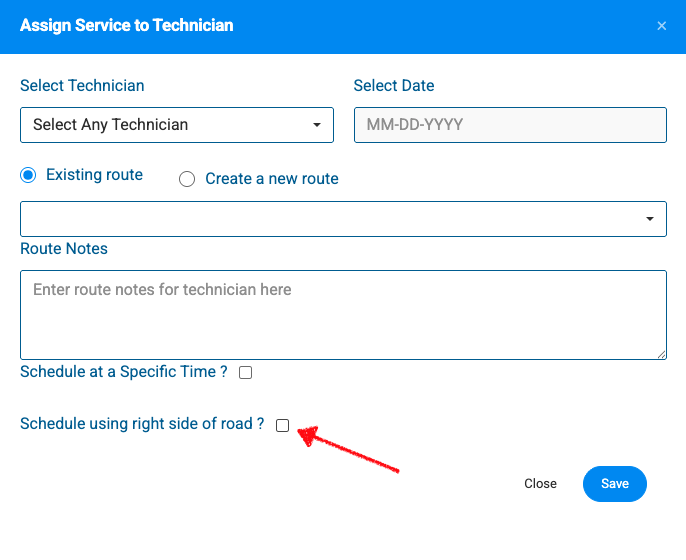
- Navigate to your Unscheduled Services map or table view.
- Select the services you want to assign and click the Assign Technician button.
- Choose your target Technician and Date.
- Select whether to add to an Existing route or Create a new route.
- Add any optional Route Notes for your technician.
- Check the box next to Schedule using right side of road? near the bottom of the window.
- Click Save to generate the optimized route.
Note: Right-Side routing can also be selected when scheduling from the Services tabs.
Best Practices for Setup
- Verify Geocoded Pins: Ensure property map pins are correctly aligned with the street front. If a map pin drops behind a property or on an alleyway, re-center the pin on the main street front using Google Autocomplete or manual Lat/Long controls.
- Review Multi-Stop Neighborhoods: When building high-density routes in residential subdivisions, run the automatic route optimization tool to let the algorithm construct natural street loops.
- Account for One-Way Streets: The system automatically respects one-way traffic constraints and adjusts the stop sequence to keep approaches safe and compliant.