
To prevent customer confusion and eliminate the need for manual workarounds, you can control whether or not a completion notice is sent on a service-by-service basis. Instead of applying a global notification to every job, you can turn completion notices On or Off for each specific type of service in your system.
Why Turn Notifications On or Off per Service?
Using a single generic completion notice for every scheduled job often leads to unnecessary customer inquiries. By managing notifications at the service level, you can tailor the customer experience based on the type of work being done:
- Turn ON for Standard Services: Keep notifications active for regular monthly services or primary treatments so customers know exactly when their property was serviced.
- Turn OFF for Internal or Discretionary Visits: Disable notifications for site visits, yard reviews, or internal service calls. This allows your team to log notes and review yards without triggering an automated alert that might cause a customer to question why they are being visited multiple times a month.
How to Enable or Disable a Completion Notice for a Service
Rather than manually toggling notifications on and off for individual customers each week, you can permanently set the notification rules directly within your service settings:
- Navigate to your Services page.
- Select the specific service you wish to edit (e.g., Site Visit or Monthly Service).
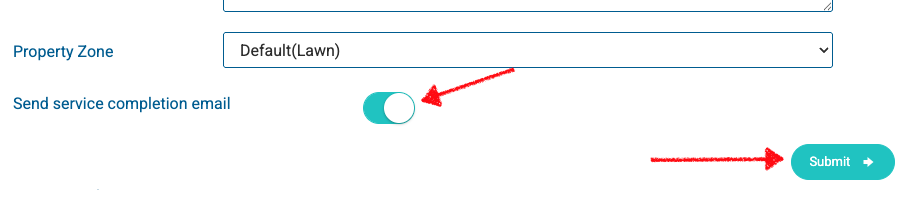
- Locate the Send service completion email setting.
- Set the preference for that service:
• Yes (On): Automatically sends a completion notice to the customer when the service is finalized.
• No (Off): Suppresses the notification entirely, allowing the service to be logged silently. - Click Submit to save.
Once configured, the system will automatically respect these boundaries, ensuring customers only receive updates for the specific services you want them to see.
Note: The default setting is that notifications will be enabled when a new service is created. The default Sales Visit service has notifications disabled by deafult.