
When you archive a program, you can also archive all of its services, both scheduled and unscheduled, on every property assigned to that program.
If these services stay active after the program is archived, they keep appearing on customer accounts and routes, which can cause confusion. This guide explains how to manage them when archiving a program.
The Automated Prompt
To streamline this process, a confirmation prompt asks whether you also want to archive the services related to the program being archived.
- Navigate to the Programs screen.
- Click the trash icon (Archive) next to the program you wish to remove.
- The Archive Program window asks: "Do you also want to archive all services (scheduled and unscheduled) associated with this program's properties?"
- Make sure the Yes, also archive all associated services option is selected.
- Click Confirm Archive.
Spraye archives every scheduled and unscheduled service tied to that program on each of its properties. Scheduled services are removed from their routes, and a note is added to each customer's account, saving you from manual cleanup.
Monthly installment plans: if the program has open monthly installment plans, the window shows a warning. Archiving the services auto-cancels those plans and releases any remaining reserved balances as customer credit. If you don't archive the services, the installment plans stay active.
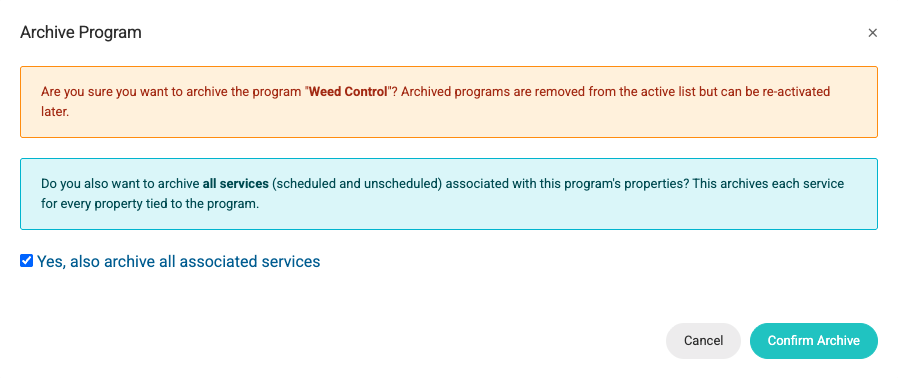
If you don't want to archive the associated services you can deselect the Yes, also archive all associated services option.
If you accidentally select the wrong program, you can click the Cancel option to cancel the process and leave everything unchanged.
Frequently Asked Questions
Q: Will this delete services that have already been completed or scheduled? A: Scheduled and unscheduled services are archived, and scheduled services are taken off their routes. Completed services and their invoices are not changed, so your historical records stay intact.
Q: Can I restore a program once it's archived? A: Archiving is designed to be a soft-delete. While you can reactivate a program, we recommend verifying customer property service lists afterward. If you archived the program's services you will also need to restore them from Archived Services once the program is reactivated.