
Overview
Previously, "Next Service Only" service-specific notes were located in the general Notes section of the technician view. To prevent these critical instructions from being missed, the system now treats them as Service Alerts. These alerts require the technician to acknowledge the message before they can begin the service and they also show in the route list on the technician dashboard (before clicking into the stop) as well as on the route summary.
New Technician Workflow: Mandatory Acknowledgment
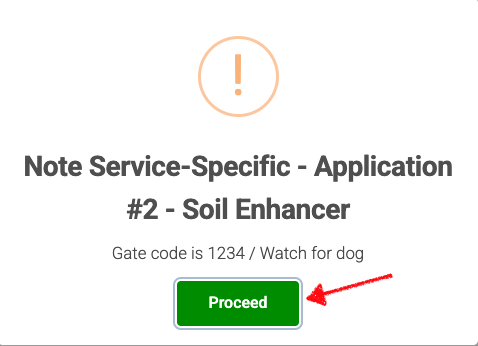
When a technician arrives at a stop and begins a service with a "Next Service Only" note attached:
Automatic Pop-up: A modal window will appear immediately upon opening the stop.
Required Action: The technician must read the alert and click a "Proceed" button.
One-Time Use: Once the service is completed, the alert "falls off" the account and will not appear for future services at that property.
Creating Alerts during the Estimate Process
To streamline operations, you can now create these high-visibility alerts while you are still in the Estimate phase.
How it Works:
Estimate Level Creation: While building an estimate, you can add a service-specific alert directly to a line item.
Conditional Activation:
If Accepted: The alert is automatically transferred to the Property record once the customer accepts the estimate.
If Declined/Ignored: The alert is automatically deleted, ensuring your property notes stay clean and relevant.
Setting Up "Next Service Only" Alerts
Navigate to the Property or Estimate screen.
Create a new Note.
Select the note type or toggle the option for "Next Service Only".
Enter the critical information (e.g., "Gate code is 1234 - Watch for dog").
Save.
Key Benefits
Guaranteed Visibility: Technicians can no longer miss specific instructions hidden in a long notes history.
Cleaner Records: Since these alerts expire after one use, you don't have to manually delete old instructions (like one-time gate codes or temporary property hazards).
Automated Admin: Linking alerts to estimates ensures that special customer requests are captured the moment the deal is made, not after the work is already scheduled.
Frequently Asked Questions
What happens if I have multiple "Next Service Only" alerts for one stop? The technician will see each alert as a pop-up. They must click "Proceed" on each one to ensure all specific instructions have been acknowledged.
Can I still make a permanent alert? Yes. Standard "Alert" types remain permanent. Only notes specifically tagged as "Next Service Only" will disappear after the service is completed.