
The Skip Service(s) feature allows you to exclude specific services from an interactive estimate when those services are no longer being offered during the current season.
This is commonly used when you are creating an estimate after one or more services in a program have already passed their normal seasonal service window and allows you to start the estimate on a specific round if you've already complete previous rounds
Instead of manually deleting those services later or using $0 price overrides, you can now select the services to skip while creating or editing the estimate.
Where to Find This Feature
The Skip Service(s) dropdown is available on:
- Interactive Estimate creation pages
- Interactive Estimate edit pages
- Interactive Estimate Template creation pages
- Interactive Estimate Template edit pages
This feature is available for Interactive Estimates only. It is not available on Legacy Estimates.
What the Skip Service(s) Dropdown Does
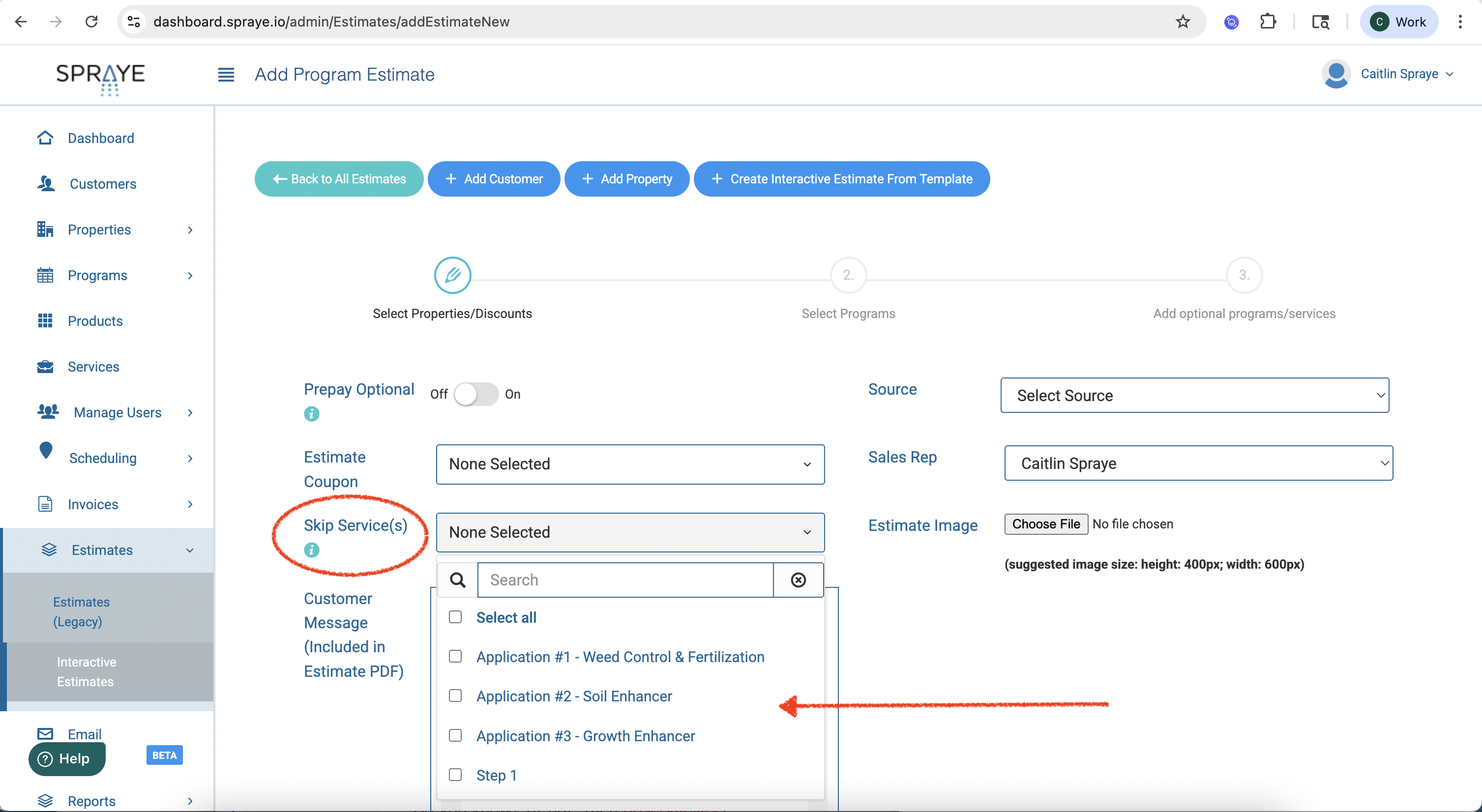
When creating or editing an interactive estimate, you can choose one or more services from the Skip Service(s) dropdown.
The dropdown includes services from your account. Any selected services will be skipped if they are included in the estimate.
This is typically used for services that are part of a program but are no longer available for the current season (we recommend creating templates to make this easier to manage).
Dropdown Instructions
Choose services here that you would like to delete if they are part of this estimate. This is typically used if you are past a normal service date for a service in your program. These services will NOT be automatically deleted on renewal.
How Skipped Services Appear on Estimates
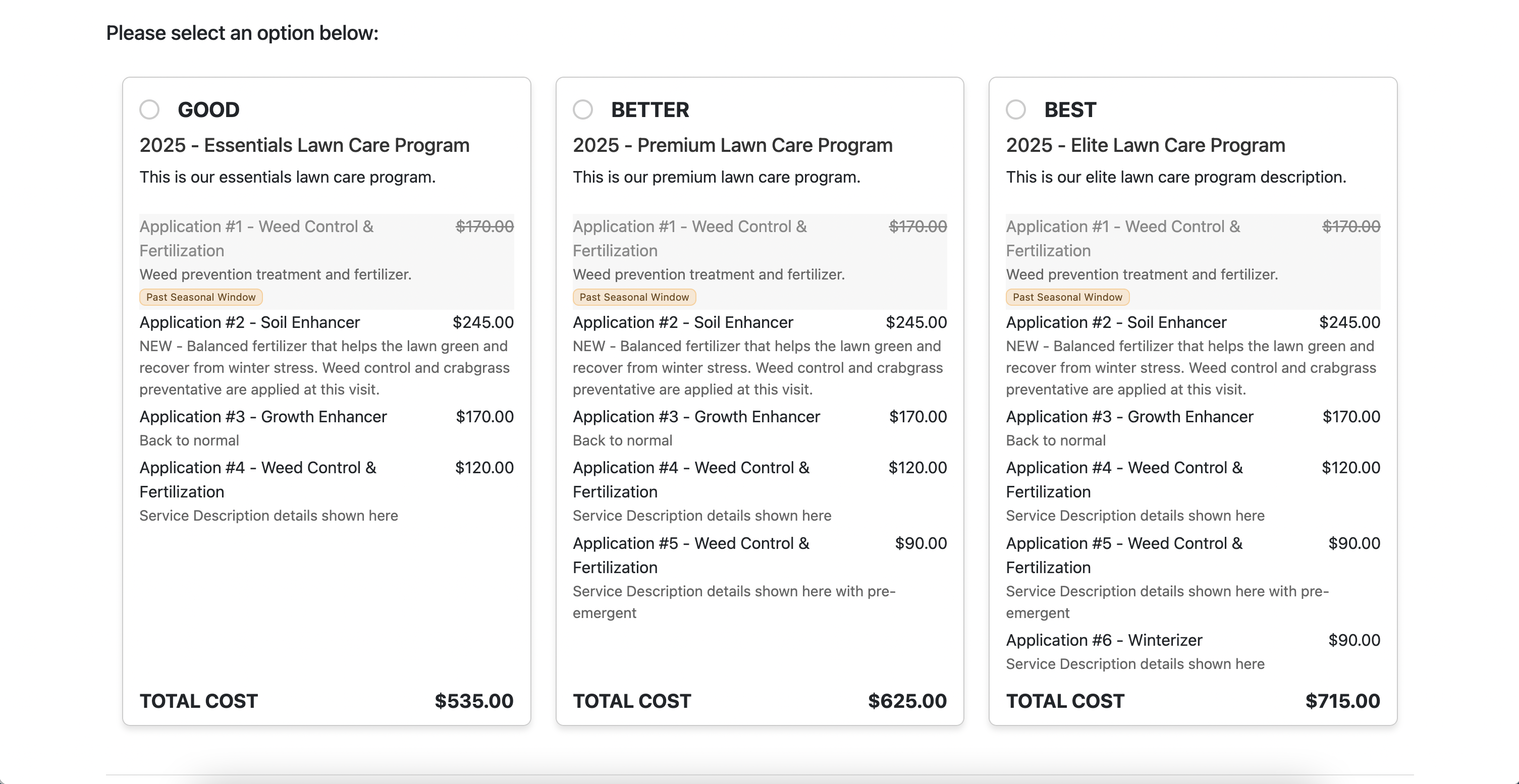
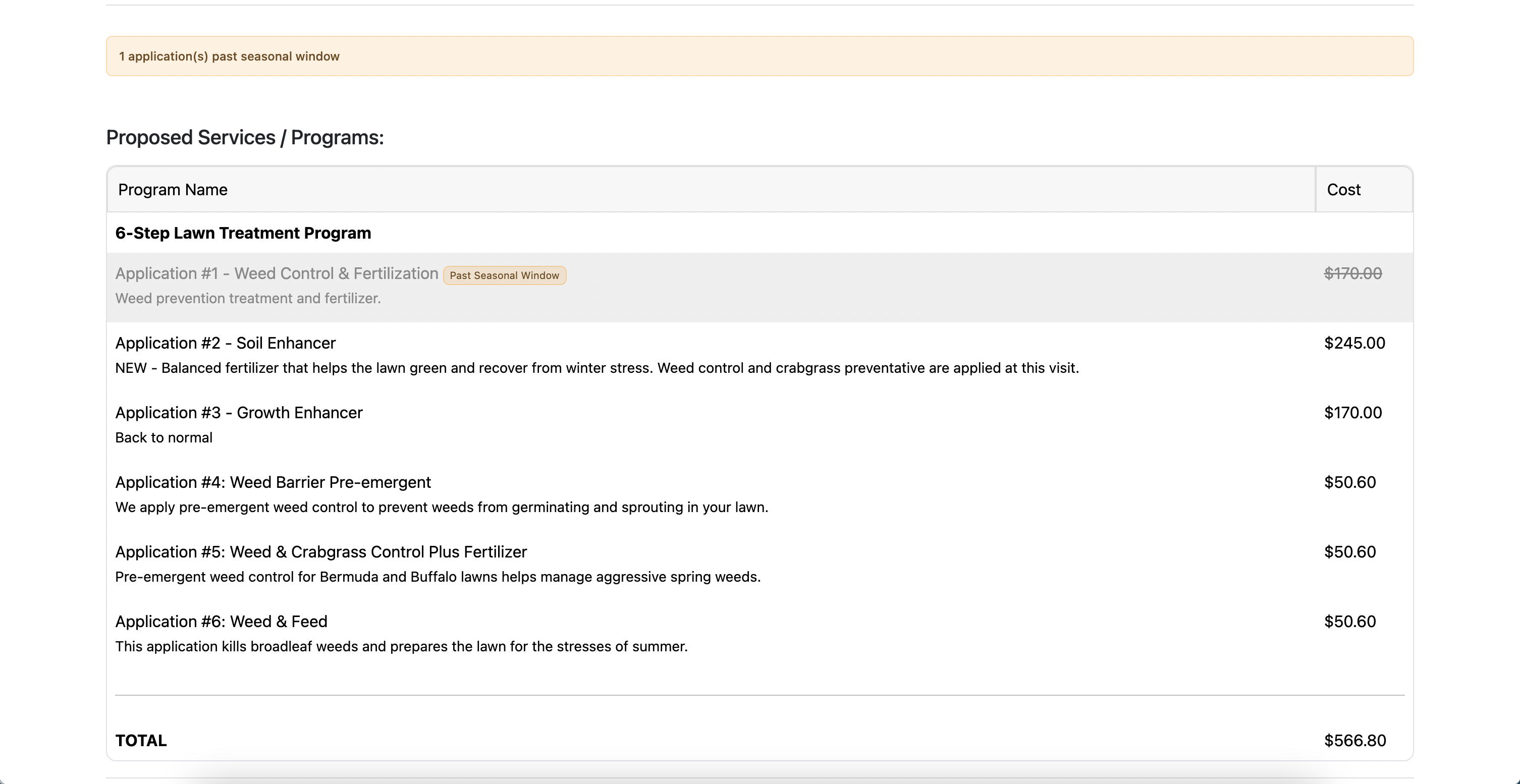
When a skipped service appears on an estimate, it will still be visible to the customer, but it will be clearly marked as unavailable for the current season.
Skipped services will appear:
- Greyed out
- With the note Past Seasonal Window
- On both the printed estimate and the online interactive estimate
The service price may still be shown, but the estimate total will not include the skipped service.
This helps customers understand that the service is normally part of the program, but is no longer being offered this season.
What Happens if the Same Service Appears in Multiple Programs?
If a skipped service is included in multiple package programs on the estimate, that service will be greyed out in every program where it appears.
For example, if Application #1 - Weed Control & Fertilization is skipped and appears in Good, Better, and Best package options, it will be marked as Past Seasonal Window in each package option.
How Totals Are Calculated
Skipped services are excluded from estimate totals.
Even though the skipped service may still display its price on the estimate, the total cost shown to the customer will not include that skipped service.
What Happens When the Estimate Is Accepted?
When a customer accepts an interactive estimate that includes skipped services, SPRAYE automatically archives the selected skipped services for the current season.
This means you no longer need to manually delete those services after the estimate is accepted.
How Skipped Services Affect Prepay Invoices
If a prepay invoice is created from the accepted estimate, skipped services are excluded from the prepay invoice.
Only the active, non-skipped services are included.
What Happens During Renewal?
Skipped services are only skipped for the current season.
When the customer’s program is renewed for the next year or season, the renewal will include the full program again, including the services that were skipped on the original estimate.
In other words, skipped services are not permanently removed from the program and are not automatically deleted on renewal.
Using Skip Services with Estimate Templates
The Skip Service(s) dropdown is also available on Interactive Estimate Templates.
This allows you to create reusable estimate templates that automatically skip certain services when used.
Interactive Estimate Templates can also be used through the Zapier integration (version 1.1.5 or higher), so skipped services can be included in estimate workflows created through Zapier.
When to Use This Feature
Use Skip Service(s) when:
- A customer is signing up after one or more seasonal services have already passed
- You want to show the full program while making it clear that certain services are no longer available this season
- You do not want skipped services included in the estimate total
- You want accepted estimates to automatically archive those services for the current season
- You want to avoid manually deleting services or using $0 price overrides
Important Notes
- Skip Services is only available for Interactive Estimates.
- Skipped services are displayed as Past Seasonal Window.
- Skipped services are not included in estimate totals.
- Skipped services are excluded from prepay invoices.
- When the estimate is accepted, skipped services are automatically archived for the current season.
- Skipped services will be included again when the program is renewed for the next season.
- If a skipped service appears in multiple package programs, it will be greyed out in all applicable programs.