
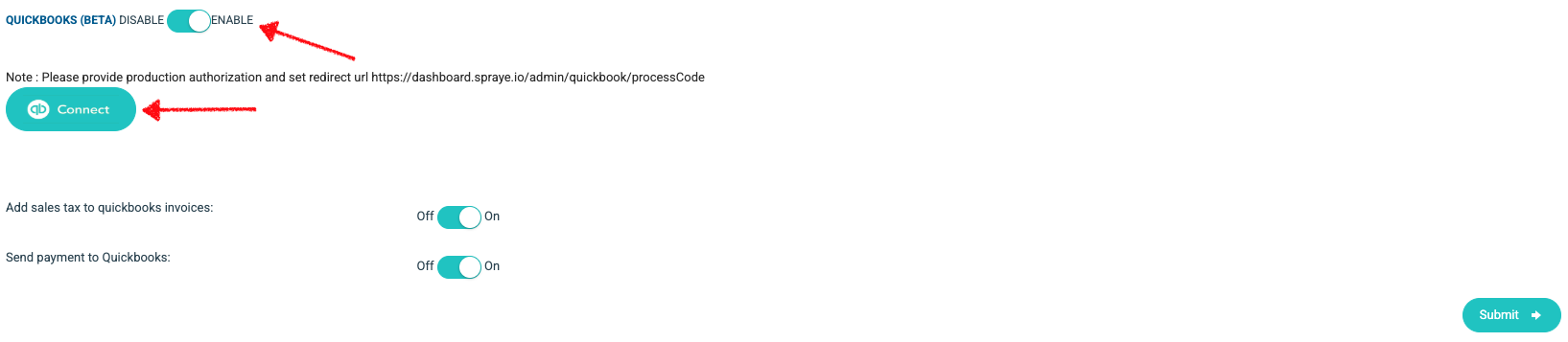
To integrate your Spraye account with your Quickbooks Online account, please follow the steps below:
- Change the Quickbooks toggle to Enable on the Global Settings page. Then click on the"Connect" button and log into your Quickbooks account. Once connected be sure to click Submit after any changes are made to this section of your settings page.
- If you're already tracking Sales Tax in Quickbooks, toggle the Add sales tax to quickbooks invoices switch at the bottom to the OFF position. If you're not tracking Sales Tax in Quickbooks, you can toggle that switch ON.
- If you turn this option "OFF", you need to make sure to enable the "Allow overcharge" option as well. This will send the full payment amount to QBO in order to correctly pay the total (amount + sales tax) in QBO.
- Once you're connected with QBO, you can see the status of invoices and payments by editing the invoice and looking at the Quickbook Invoice Status at the bottom of the page.
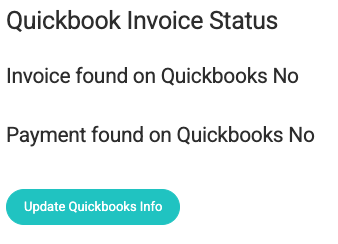
- If an invoice or Payment is not found on Quickbooks you can click the Update Quickbooks Info button to sync it to Quickbooks.
IMPORTANT NOTES:
- "Available Credits" or credit added to any customers account DO NOT sync over to Quickbooks.
- Tips are passed to QuickBooks Online as a separate line item
- We do not currently integrate with QBO Canada.