

We are thrilled to introduce our new notes and tasks system within Spraye. These new notes and tasks can be utilized for customers, properties and technicians to keep track of anything related a customer or property such as call logs or other customer service notes, but also to allow the technicians to leave notes while at a property. This system can also be used to assign tasks to any user in the system.
Main Features
- Attach images or documents to each note to store any type of information you might need for that customer or property
- Assign specific users to a task note with a specific due date (including yourself)
- Users can comment on notes and collaborate
- You can designate notes to be visible to the technician on the tech view at each stop (or opt to keep certain notes off their screen)
- We also have a special type of note that is designed specifically for technicians that requires them to answer questions about their visit for each (optional)
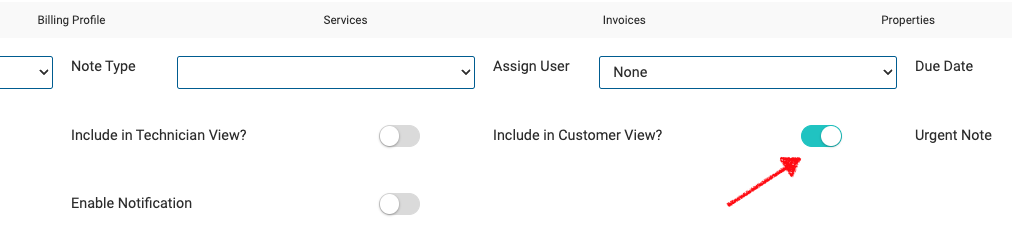
When adding a property note if the "Include in Customer View" option is turned on then the note will show in the Notes tab in the customer portal.
Automated email notifications automatically alert team members on the day a task note is due, ensuring key action items are never missed.
Timing & Delivery Mechanics
- Delivery Schedule: Notifications are sent at 8:00 AM local time on the day the task note is due.
- Execution: An hourly background job checks which companies have reached 8:00 AM in their designated timezone settings.
- Trigger Criteria: The system evaluates and dispatches alerts for all Open notes matching the current due date. Closed notes are automatically skipped.
- Recipients: Delivered to the designated Assigned To user and any email addresses added to the
Notification_todistribution list. - Exclusions: The Note Creator is automatically excluded from receiving these notifications.
- Subject:
Task Reminder - Due Today - Body Details:
• Task Details: Full description text of the note.
• Customer Name: Direct link to the associated customer profile.
• Property Name: Direct link to the associated property profile.
• Sign-off: "Cheers, The SPRAYE Team"
Note: The Customer Name and Property Name links are automatically omitted if the note is not linked to a specific customer or property record.