
The Cancel Details Report allows you to track, analyze, and measure lost revenue resulting from program and service cancellations. By monitoring cancellation trends and reasons, you can gain actionable insights to improve customer retention and service offerings.
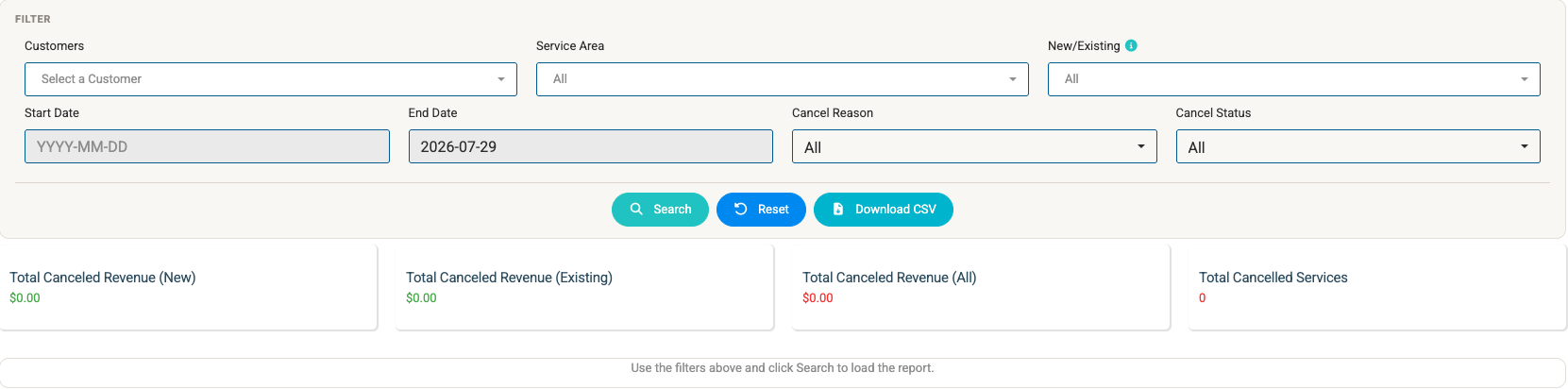
Filter Options
Customize your report view using the filter bar at the top of the page:
- Customers: Filter by a specific customer account or leave as default to view all customers.
- Service Area: Filter results by a designated technician or geographic service zone.
- New/Existing: Isolate cancellations based on account longevity (New customers vs. Existing long-term accounts).
- Start Date / End Date: Define a specific date range (
YYYY-MM-DD) to evaluate cancellations during a given timeframe. - Cancel Reason: Narrow down search results by selecting a specific cancellation reason (e.g., Moved, Unhappy with results). Cancel Reasons can be configured on the Global Settings page.
- Cancel Status: Filter by the current status of the cancellation.
Action Buttons
- Search: Applies selected filters and updates the metrics and table below.
- Reset: Clears all active filters back to their default state.
- Download CSV: Exports the filtered cancellation data into a downloadable spreadsheet file for external reporting.
Metric Cards Overview
At the top of the report, summary cards provide quick financial totals based on your active filters:
- Total Canceled Revenue (New): Total revenue lost from newly acquired customer accounts.
- Total Canceled Revenue (Existing): Total revenue lost from established, long-term customer accounts.
- Total Canceled Revenue (All): Aggregate revenue lost across all canceled services and programs.
- Total Cancelled Services: Total count of individual canceled service lines or program rounds.
Data Table Breakdown
The lower table displays line-item details for every canceled service or program matching your filters:
| Column Header | Description |
|---|---|
| Customer | Name of the customer account (clickable to open profile). |
| Customer Start Date | The date the customer originally signed up or was added to the system. |
| Primary contact email address associated with the account. | |
| Phone | Primary contact phone number for the account. |
| Service Name | Name of the specific service or application round that was canceled. |
| Property Name | Name or address of the property location associated with the cancellation. |
| Program Name | Name of the parent service program (if applicable). |
| Cost | Dollar value/revenue associated with the canceled service. |
| Reason | Recorded reason provided for the cancellation (e.g., Moved). |
| Cancel Date | Official date on which the cancellation was recorded in the system. |
Additional Features
- Table Search: Use the search bar above the table to quickly locate specific keywords, customer names, or property details within the displayed results.
- Print Table: Click the teal Print table button in the upper right to generate a print-friendly view or PDF export of the current table display.