
Single Service Discounts on Interactive Estimates
Single Service Discounts allow you to apply a discount or promo code to a specific service within an interactive estimate—without discounting the entire estimate.
This gives you more flexibility to run targeted promotions, offer one-time incentives, or adjust pricing at a more granular level.
How It Works
With Single Service Discounts, you can:
- Apply a discount to one specific service within a package
- Apply discounts to multiple services across one or more packages
- Offer targeted pricing adjustments without affecting the full estimate
- Add discounts to estimate templates for consistent use
For example, you could:
- Discount only a grub control service
- Offer a promotion on a mosquito package
- Apply a discount to the first or last service in a premium package
- Incentivize upgrades by discounting services in your “Best” package
How to Add a Single Service Discount
Single Service Discounts are added in the same place as service price overrides.
Step 1: Expand Overrides & Discounts
Click the blue section:
“Click Here to View/Enter Overrides and Discounts”
This will expand the area where you can adjust pricing and apply discounts.
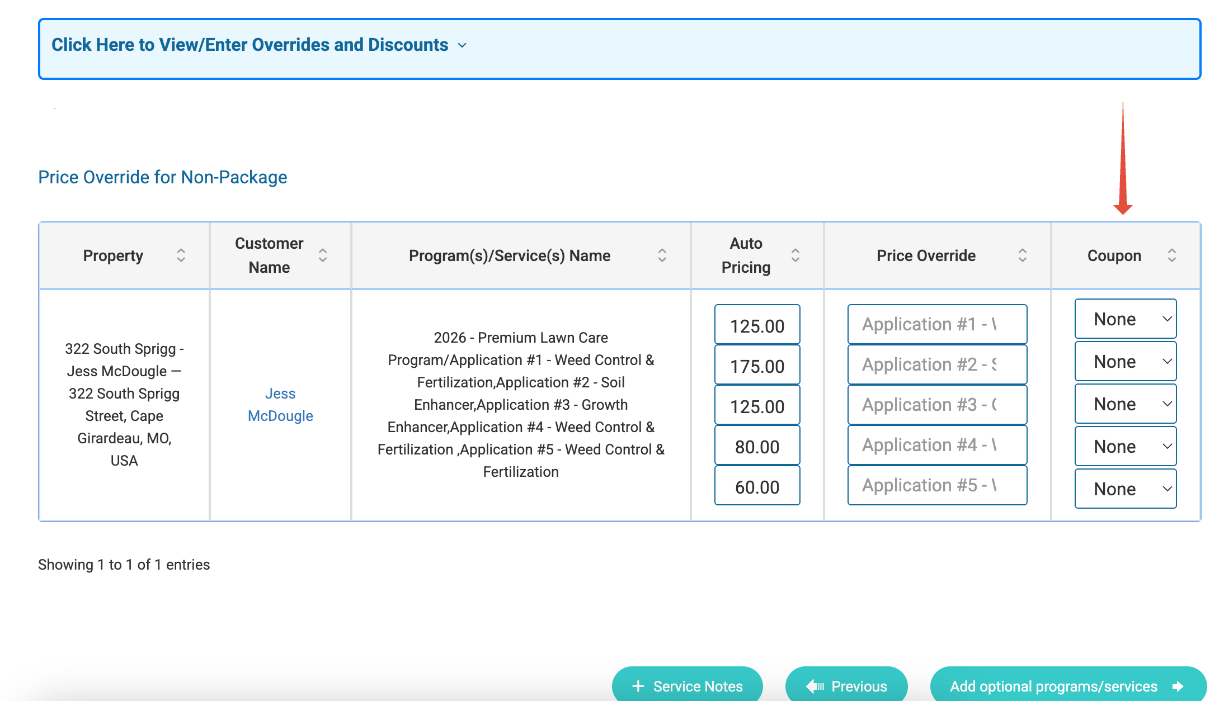
Step 2: Apply Discounts to Specific Services
Within the expanded section:
- Locate the service(s) you want to discount
- Use the Coupon dropdown to select the discount for that specific service
Important:
- You can apply discounts to individual services within a package
- You can apply discounts across multiple services and multiple packages
- This can be done in each section of the estimate:
- Required
- Optional
- Prepay
Step 3: Save Your Estimate
Once your discounts are applied:
- Click Create and Send or Save as Draft
- The discounts will now be reflected in the interactive estimate
How Discounts Are Displayed to Customers
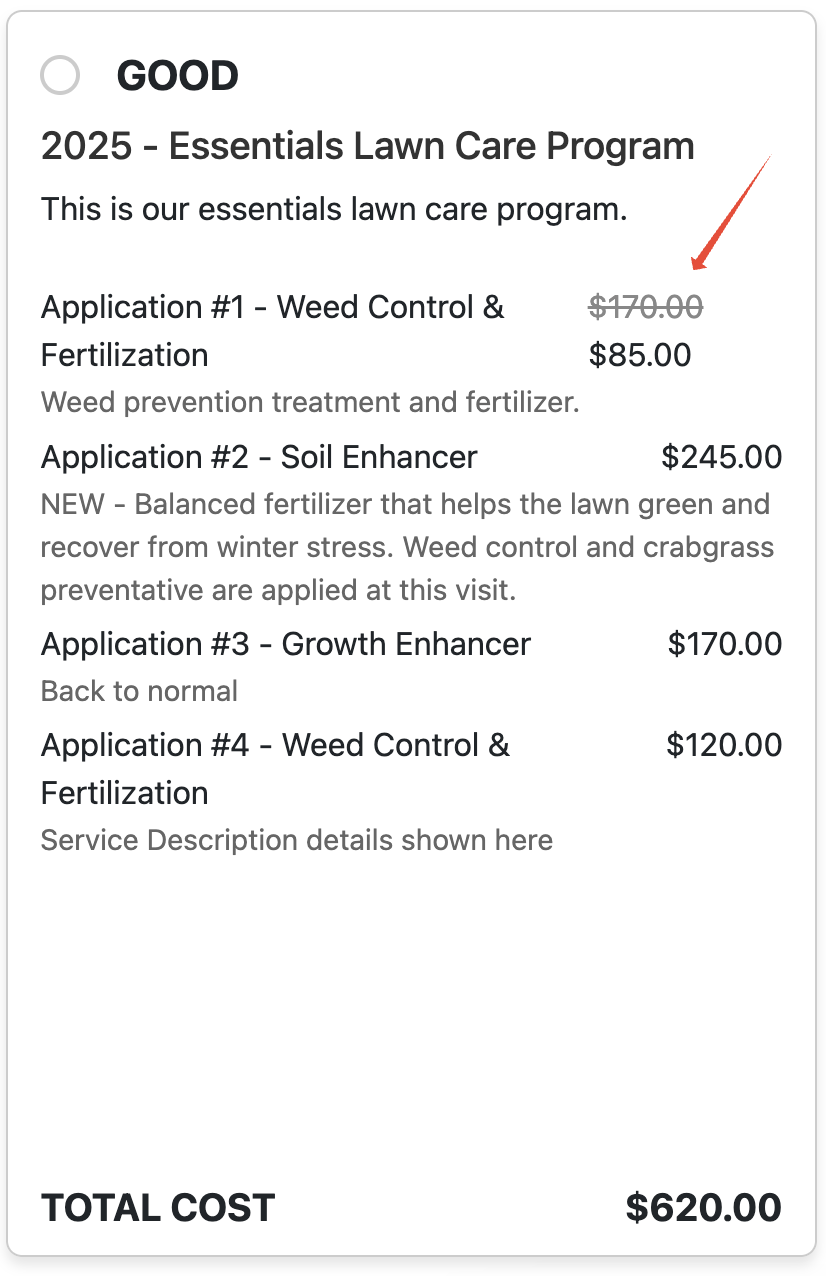
When a Single Service Discount is applied:
- The original price is shown with a strikethrough
- The discounted price is displayed directly below it
- Only the specific discounted service is affected
- Other services remain unchanged
This makes it easy for customers to clearly see:
- Which service is discounted
- How much they are saving
When to Use Single Service Discounts
This feature is especially useful for:
- Service-specific promotions (e.g., discounted mosquito treatments)
- New customer offers
- One-time discounts
- Package-level incentives
- Sales flexibility when adjusting estimates
Important Notes
- Does not carry over to renewals
Discounts apply only to the current estimate and will not persist into future services. - Combines with other discounts
Can be used alongside estimate-level discounts. - Calculated first
Single Service Discounts are applied before any other discounts. - Works across templates and estimates
Can be configured directly on estimates or built into estimate templates.
FAQ
Can I apply a discount to just one service in a package?
Yes — you can apply a discount to any individual service without affecting the rest of the package.
Can I apply discounts to multiple services?
Yes — you can apply discounts to multiple services across one or more packages.
Do these discounts carry over to renewals?
No — Single Service Discounts only apply to the current estimate.
Can this be used with other discounts?
Yes — they combine with other discounts and are applied first.
Can I add these to estimate templates?
Yes — you can configure Single Service Discounts within templates for consistent use.
Where do I add these discounts?
In the “Click Here to View/Enter Overrides and Discounts” section, using the Coupon dropdown next to each service.
Summary
Single Service Discounts give you precise control over pricing within interactive estimates—allowing you to run targeted promotions, incentivize upgrades, and close deals without discounting the entire estimate.